> For the complete documentation index, see [llms.txt](https://docs.thryve.health/llms.txt). Markdown versions of documentation pages are available by appending `.md` to page URLs; this page is available as [Markdown](https://docs.thryve.health/integrate-your-mobile-app/setup-thryve-sdk/ios.md).
# iOS
The Thryve iOS SDK is the fastest way to implement Thryve's product into your iOS application and is required to allow users to connect Apple Health as a data source. The Thryve iOS SDK is available as Cocoapods and frameworks. It requires:
* **Xcode:** version 14.2 or later.
* **iOS Target:** version 14 or higher is recommended.
{% tabs %}
{% tab title="Integration via Cocoapods" %}
To integrate the Thryve iOS SDK modules via **Cocoapods** into your application, follow these steps:
1. **Add Thryve Specs Repository**\
Open your terminal and navigate to your project directory. Then, execute the following command to add the Thryve Specs repository:
```
pod repo add ThryveSpecs https://git.thryve.de/thryve/Specs.git
```
2. **Update Your Podfile**\
Modify your Podfile to include the necessary Thryve SDK modules. Refer to the sample [Podfile](https://git.thryve.de/thryve/sdk/-/blob/master/iOS/ThryveConnectorSample/Podfile?ref_type=heads) provided in the Thryve iOS [Sample App](https://git.thryve.de/thryve/sdk/-/tree/master/iOS?ref_type=heads) for guidance.
3. **Install Pods**\
Run the following command in your terminal to install the specified pods:
```
pod install
```
Ensure you regularly update the Thryve Specs repository to get the latest features and fixes. For more details, visit the Thryve Specs Git repository: [Thryve Specs](https://git.thryve.de/thryve/Specs.git).
```ruby
platform :ios, '13.0'
source 'https://git.thryve.de/thryve/Specs.git'
target 'ThryveConnectorSample' do
use_frameworks!
pod 'ThryveCore', '5.3.1'
pod 'ThryveCommons', '5.3.1'
pod 'ThryveAppleHealth', '5.3.1'
pod 'ThryveShenAI', '5.3.1'
pod 'ThryveObservability', '5.3.1'
pod 'ThryveBLE', '5.3.1'
pod 'ThryveGarminCompanion', '5.3.1'
end
```
{% endtab %}
{% tab title="Integration via frameworks" %}
To integrate the Thryve iOS SDK into your app manually, download the Thryve SDK framework files and sample app code. Follow the instructions below for seamless integration.
| Module Name | Download Version |
| --------------------- | ----------------------------------------------------------------------------------------------------------------------------- |
| ThryveCore | [5.3.1](https://git.thryve.de/thryve/sdk/-/blob/master/iOS/xcframeworks/thryve_core_sdk_5.3.1.xcframework.zip) |
| ThryveCommons | [5.3.1](https://git.thryve.de/thryve/sdk/-/blob/master/iOS/xcframeworks/thryve_commons_sdk_5.3.1.xcframework.zip) |
| ThryveAppleHealth | [5.3.1](https://git.thryve.de/thryve/sdk/-/blob/master/iOS/xcframeworks/thryve_apple_health_sdk_5.3.1.xcframework.zip) |
| ThryveShenAI | [5.3.1](https://git.thryve.de/thryve/sdk/-/blob/master/iOS/xcframeworks/thryve_module_shen_ai_5.3.1.xcframework.zip) |
| ShenaiSDK | [3.0.2](https://git.thryve.de/thryve/sdk/-/blob/master/iOS/xcframeworks/ShenaiSDK._3.0.2.xcframework.zip) |
| Sample App | [5.3.1](https://git.thryve.de/thryve/sdk/-/tree/master/iOS/ThryveiOSSampleApp) |
| ThryveObservability | [5.3.1](https://git.thryve.de/thryve/sdk/-/blob/master/iOS/xcframeworks/thryve_observability_5.3.1.xcframework.zip) |
| ThryveBLE | [5.3.1](https://git.thryve.de/thryve/sdk/-/blob/master/iOS/xcframeworks/thryve_ble_5.3.1.xcframework.zip) |
| ThryveGarminCompanion | [5.3.1](https://git.thryve.de/thryve/sdk/-/blob/master/iOS/xcframeworks/thryve_module_garmin_companion_5.3.1.xcframework.zip) |
#### Adding and Linking a Framework in Xcode
1. **Add Framework**
1. Right-click on your Xcode project's root and create a `New Group` named `Framework`.
2. Drag and drop the extracted `.xcframework` folders from Finder into this group.
3. In the dialog box, select `Copy items if needed`, `Create folder references`, and choose the targets for the framework.
2. **Link Framework**
1. Navigate to `project root > target > General`.
2. Add the frameworks to `Frameworks, Libraries, and Embeded Content` by clicking the **+** button.
3. Select the desired framework, such as `ThryveCore` or `ThryveCommons` .
4. Choose `Embed & Sign` .
If you have followed the import correctly, the screen should look like this, depending on the imported frameworks.
{% hint style="info" %}
A runtime error such as the following indicates that the `Embed & Sign` setting was not correctly applied to an added framework:
`dyld[5119]: Library not loaded: @rpath/ThryveCommons.framework/ThryveCommons`\
`../ThryveCommons.framework/ThryveCommons' (no such file),`
{% endhint %}
{% endtab %}
{% tab title="Integration via SPM" %}
To integrate the Thryve iOS SDK modules via Swift Package Manager (SPM) into your application, follow these steps:
1. **Add Thryve Package Repository**
1. In Xcode, navigate to `File > Add Package Dependencies`. In the search field, enter the Thryve package repository URL: \
\
`https://git.thryve.de/thryve/Pods` \
\
Xcode will find the package.
2. Set the `Dependency Rule` to `Up to Next Major Version` starting from your desired version (e.g. 5.3.1), select your project under `Add to Project`, and click `Add Package`.\
2. **Choose Package Products**\
After the package is fetched, Xcode will present a list of available package products.
1. Select the modules you need and assign them to the appropriate target.
2. Click `Add Package` to confirm.
{% endtab %}
{% endtabs %}
{% hint style="info" %}
If an `Undefined symbol:` error occurs, ensure that all modules use the same SDK version. For example, `ThryveAppleHealth.xcframework` (or Pod) version `5.0.2` cannot be used together with `ThryveCommons.xcframework` (or Pod) version `5.0.4`.
{% endhint %}
## App Store Privacy Compliance Configuration
### Adding a Privacy Manifest File
Starting May 1, 2024, all apps and third-party SDKs must include the use of [required reason API](https://developer.apple.com/documentation/bundleresources/privacy_manifest_files/describing_use_of_required_reason_api), such as [`UserDefaults`](https://developer.apple.com/documentation/foundation/userdefaults), in their privacy manifest file for App Store Connect approval. Follow these steps:
1. **Create a Privacy Manifest File**: Ensure your app includes a [manifest file](https://developer.apple.com/documentation/bundleresources/privacy_manifest_files).
2. **Specify Privacy API Types**: Add `Privacy Accessed API Types` or `NSPrivacyAccessedAPITypes` to your file.
3. **Provide API Reasoning**: Under `Privacy Accessed API Reasons`, or `NSPrivacyAccessedAPITypeReasons`, list `CA92.1` in an array. More details can be found [here](https://developer.apple.com/documentation/bundleresources/privacy_manifest_files/describing_use_of_required_reason_api#4278401).
The PrivacyInfo.xcprivacy plist file should look similar to this sample
```xml
NSPrivacyAccessedAPITypesNSPrivacyAccessedAPITypeReasonsCA92.1NSPrivacyAccessedAPITypeNSPrivacyAccessedAPICategoryUserDefaults
```
## Apple Health (HealthKit) project configuration
### Integrate ThryveAppleHealth module
To add HealthKit to your iOS app:
* Integrate `ThryveAppleHealth`, along with `ThryveCore` and `ThryveCommons`.
* Use either CocoaPods or framework files for installation.
* This setup allows users to connect with Apple Health and retrieve health data automatically.
### Add HealthKit to project & configure Info.plist
To be able to build your app with integrated `ThryveAppleHealth` module you need to:
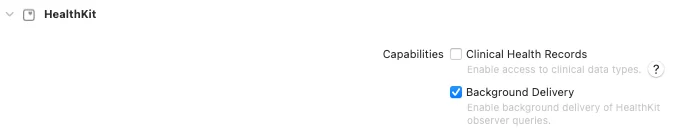
1. **Enable HealthKit**
1. In Xcode: Navigate to *Target → Signing & Capabilities → add (+) → HealthKit*.
2. For [Background Sync feature](/integrate-your-mobile-app/connect-data-sources.md) to work, ensure *Background Delivery* is enabled.
2. **Update your app's `info.plist`**
```xml
NSHealthShareUsageDescriptionThis app needs permission to share your health data.NSHealthUpdateUsageDescriptionThis app needs permission to update your health data.
```
{% hint style="warning" %}
Although `ThryveAppleHealth` module does not update data via HealthKit, `NSHealthUpdateUsageDescription` is required. A missing description will lead to rejection during the App Store review process.
{% endhint %}
{% hint style="success" %}
Read [the ThryveBLE Set-up guide](https://docs.thryve.health/integrate-your-mobile-app/direct-bluetooth-device-connection) for additional information on how to set-up the ThryveBLE module
{% endhint %}
{% hint style="success" %}
Read [the ThryveShenAI Set-up guide](https://docs.thryve.health/integrate-your-mobile-app/camera-based-health-data-recording) for additional information on how to set-up the ThryveShenAI module
{% endhint %}
---
# Agent Instructions
This documentation is published with GitBook. GitBook is the documentation platform designed so that both humans and AI agents can read, navigate, and reason over technical content effectively. Learn more at gitbook.com.
## Querying This Documentation
If you need additional information that is not directly available in this page, you can query the documentation dynamically by asking a question.
Perform an HTTP GET request on the current page URL with the `ask` query parameter, and the optional `goal` query parameter:
```
GET https://docs.thryve.health/integrate-your-mobile-app/setup-thryve-sdk/ios.md?ask=&goal=
```
`ask` is the immediate question: it should be specific, self-contained, and written in natural language.
`goal` is optional and describes the broader end goal you are ultimately trying to accomplish on behalf of the user. GitBook uses it to tailor the answer towards what is most useful for that goal.
The response will contain a direct answer to the question and relevant excerpts and sources from the documentation.
Use this mechanism when the answer is not explicitly present in the current page, you need clarification or additional context, or you want to retrieve related documentation sections.