> For the complete documentation index, see [llms.txt](https://docs.thryve.health/llms.txt). Markdown versions of documentation pages are available by appending `.md` to page URLs; this page is available as [Markdown](https://docs.thryve.health/getting-started/thryve-sdk-4.x-to-5.x-migration.md).
# Thryve SDK 4.x to 5.x migration
This page covers migrations from previous to latest versions.
In version 5.0.0, the Thryve SDK introduced major changes to its architecture. If your application was built using Thryve SDK 4.x.x, ensure to complete the actions listed in the following sections to have a smooth migration of your Thryve implementation in your application to Thryve SDK 5.0.0.
## **Core changes**
The 5.0 update introduces a `ThryveSDK` singleton, streamlining access to the SDK's functionality. This unified interface simplifies interactions by encapsulating all internal mechanisms.
### CoreConnector is now ThryveSDK
In version 5.0.0, `ThryveSDK` replaces `CoreConnector`. As a singleton, `ThryveSDK` it consolidates the functionalities of `CoreConnector` . Initializing `CoreConnector` is now obsolete.
Initialize the SDK using:
```swift
await ThryveSDK.getOrCreate(thryveSDKConfig).getUserInformation()
// Optionally, when ThryveSDK is initialized from a non-async context (AppDelegate, legacy code, etc.),
// it is recommended to use the getOrCreate(...) callback to know when the SDK is ready.
ThryveSDK.getOrCreate(thryveSDKConfig) { initResult in
if initResult.successful {
Logger.i("ThryveSDK ready, you can start calling API methods")
} else if let error = initResult.errors?.first {
Logger.e("ThryveSDK init failed: \(error.errorMessage ?? "Unknown error")")
}
}
```
Check [Initialize the Thryve SDK](https://docs.thryve.health/integrate-your-mobile-app/connect-data-sources#initialize-the-thryve-sdk) section for more info.
### Centralized (module) configuration
All configuration options provided to developers are within the `ThryveSDKConfig` object. See [documentation](/integrate-your-mobile-app/connect-data-sources.md#initialize-the-thryve-sdk) for further information.
### Accessing (module) functions
All module functions, like those from `ThryveAppleHealth` or `ThryveHealthConnect`, are now accessed through:
```swift
ThryveSDK.get().getUserInformation()
ThryveSDK.get().synchronize(...)
ThryveSDK.get().backfillEpoch(...)
```
### Automated User Creation with Thryve SDK
In Thryve SDK 4.x, developers needed to call `getAccessToken` to create or fetch users. This process is now [automated during SDK initialization](/integrate-your-mobile-app/connect-data-sources.md#create-a-thryve-user). To obtain the `endUserId` (previously `accessToken`) for backend operations, use the new `getEndUserId` method.
### Thryve Connection Widget replaces the former screen provided via `dataSourceUrl`
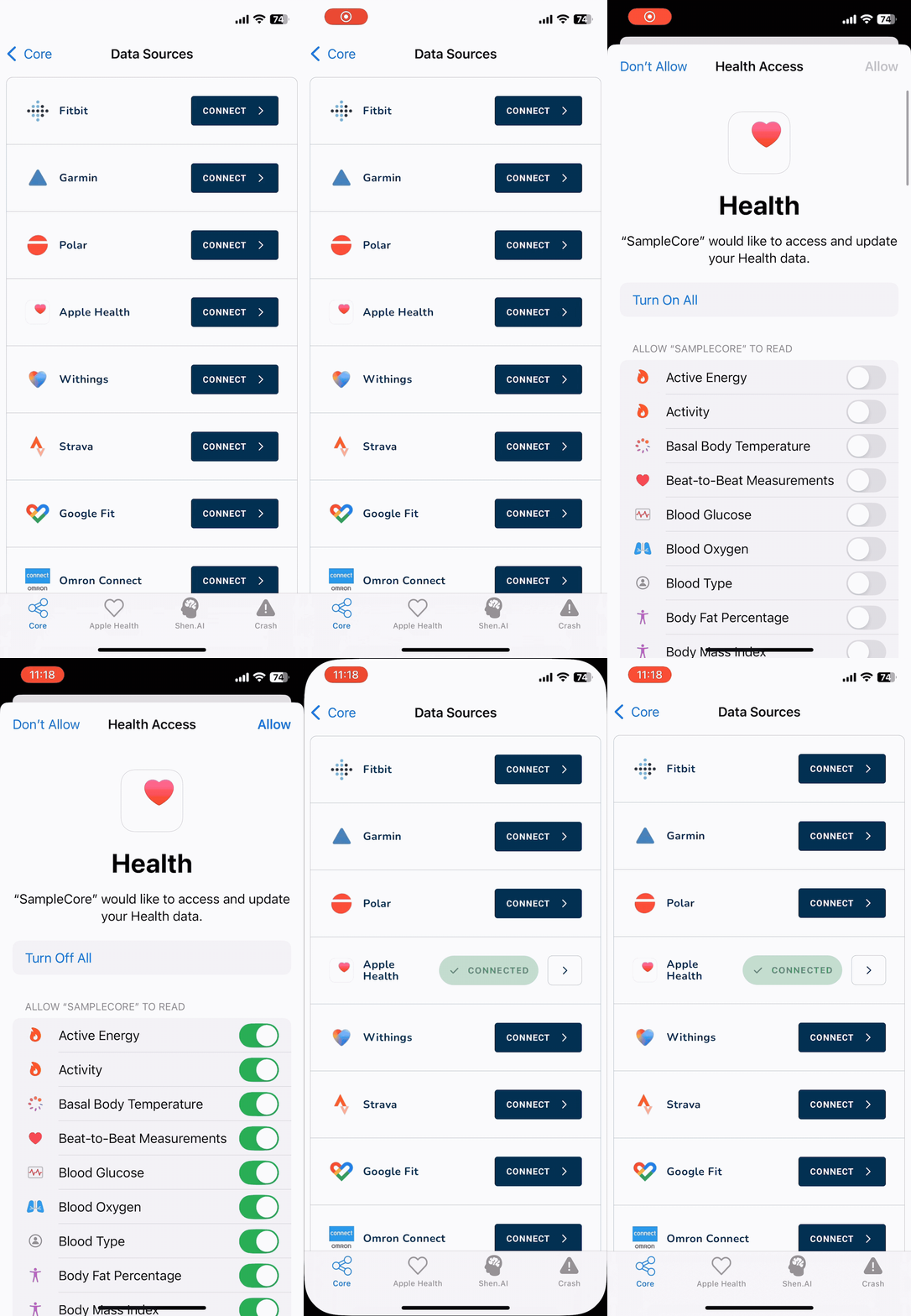
With the release of Thryve SDK 5.0.0, we've introduced the new [`ThryveDataSourceConnectionWidget`](/integrate-your-mobile-app/connect-data-sources.md#display-the-thryve-connection-widget). This widget empowers your users to easily connect and disconnect all enabled data sources for your application, eliminating the need for you to implement additional views or logic - the Thryve SDK takes all care.
Thryve Connection Widget makes it super simple to allow users to connect theiir data sources
Unlike the previous screen provided via `dataSourceURL`, the `ThryveDataSourceConnectionWidget` now supports native data sources such as Apple Health, Health Connect, and Samsung Health, provided the necessary modules are added and configured in your application.
## Plattform-specific changes
{% tabs %}
{% tab title="iOS SDK" %}
### ModuleAppleHealth is now ThryveAppleHealth
The Apple Health module of the Thryve iOS SDK was previously named `ModuleAppleHealth` and has been renamed to `ThryveAppleHealth` . All imports and references to `ModuleAppleHealth` should be changed to `ThryveAppleHealth` .
### HKConnector initialization is obsolete
The manual initialization of `HKConnector` is no longer required in 5.0.0. [ThryveSDK](/integrate-your-mobile-app/connect-data-sources.md#ios) singleton handles all the internal mechanisms of `HKConnector` .
{% endtab %}
{% tab title="Android SDK" %}
### Base package name changed
The base package name of the Android SDK is renamed from `com.thryve.connector` to `com.thryve.sdk` all references and imports should be updated accordingly. The Thryve SDK dependencies in `build.gradle` should be renamed to:
```gradle
dependencies {
...
api "com.thryve.sdk:core:${thryve_sdk_version}"
}
```
### Thryve Health Connect module package renamed
The package name of the Thryve SDK Health Connect module is renamed to `com.thryve.sdk.healthConnect`. It was named `com.thryve.connector.module_hconnect` in all versions before 5.0.0. All references and imports should be updated accordingly.
### ThryveHealthConnectConnector initialization is obsolete
The manual initialization of `ThryveHealthConnectConnector` is no longer required in 5.0.0. [ThryveSDK](/integrate-your-mobile-app/connect-data-sources.md#android) singleton handles all the internal mechanisms of `ThryveHealthConnectConnector`
### Thryve Samsung Health module package renamed
The package name of the Thryve SDK Samsung Health module is renamed to `com.thryve.sdk.samsungHealth` . It was named `com.thryve.connector.shealth` in all versions before 5.0.0. All references and imports should be updated accordingly.
### SHealthConnector initialization is obsolete
The manual initialization of `SHealthConnector` is no longer required in 5.0.0. [ThryveSDK](/integrate-your-mobile-app/connect-data-sources.md#android) singleton handles all the internal mechanisms of `SHealthConnector`
{% endtab %}
{% endtabs %}
## Adapted naming of keywords and variables
With the introduction of Thryve SDK 5.0.0, we have renamed certain keywords and variables to improve clarity. Parameters will be aligned with webhooks and Thryve backend API with the release of next API version. (coming in August)
| Previous Variable/Parameter | Current Variable/Keyword | Description |
| ----------------------------------- | ------------------------ | --------------------------------------------------------------------------------------------------------------------------------------------------------------------------------------------------------------- |
| `appId` | `authId` | Credentials to authorize your app with the Thryve SDK. |
| `appSecret` | `authSecret` | Credentials to authorize your app with the Thryve SDK. |
| `partnerUserID` | `endUserAlias` | Alias for Thryve user that can be set optionally by you. Make sure to set a secure, non-predictable, unique identifier without personal identifiable information to keep Thryve data pseudonomous. |
| `accessToken`/`authenticationToken` | `endUserId` | Unique identifier of Thryve user automatically generated by Thryve backend. All data saved with Thryve is linked to this endUserId. It is also used to specify the user you request data for with Thryve's API. |
| `language` | `locale` | The language code following [ISO 639-1](https://www.loc.gov/standards/iso639-2/php/code_list.php) to set the language that will be used on UI elements, e.g. the Thryve Widget. |
---
# Agent Instructions
This documentation is published with GitBook. GitBook is the documentation platform designed so that both humans and AI agents can read, navigate, and reason over technical content effectively. Learn more at gitbook.com.
## Querying This Documentation
If you need additional information that is not directly available in this page, you can query the documentation dynamically by asking a question.
Perform an HTTP GET request on the current page URL with the `ask` query parameter, and the optional `goal` query parameter:
```
GET https://docs.thryve.health/getting-started/thryve-sdk-4.x-to-5.x-migration.md?ask=&goal=
```
`ask` is the immediate question: it should be specific, self-contained, and written in natural language.
`goal` is optional and describes the broader end goal you are ultimately trying to accomplish on behalf of the user. GitBook uses it to tailor the answer towards what is most useful for that goal.
The response will contain a direct answer to the question and relevant excerpts and sources from the documentation.
Use this mechanism when the answer is not explicitly present in the current page, you need clarification or additional context, or you want to retrieve related documentation sections.