> For the complete documentation index, see [llms.txt](https://docs.thryve.health/llms.txt). Markdown versions of documentation pages are available by appending `.md` to page URLs; this page is available as [Markdown](https://docs.thryve.health/integrate-your-mobile-app/connect-data-sources.md).
# Connect data sources
Integration of Thryve SDK takes barely more than a few minutes to connect data sources up and running including native data sources.
Assuming you have set up your mobile app project as outlined and have added the Thryve SDK via dependency management or manually via framework files, you have everything to get going to get your users to connect their data source with your application.
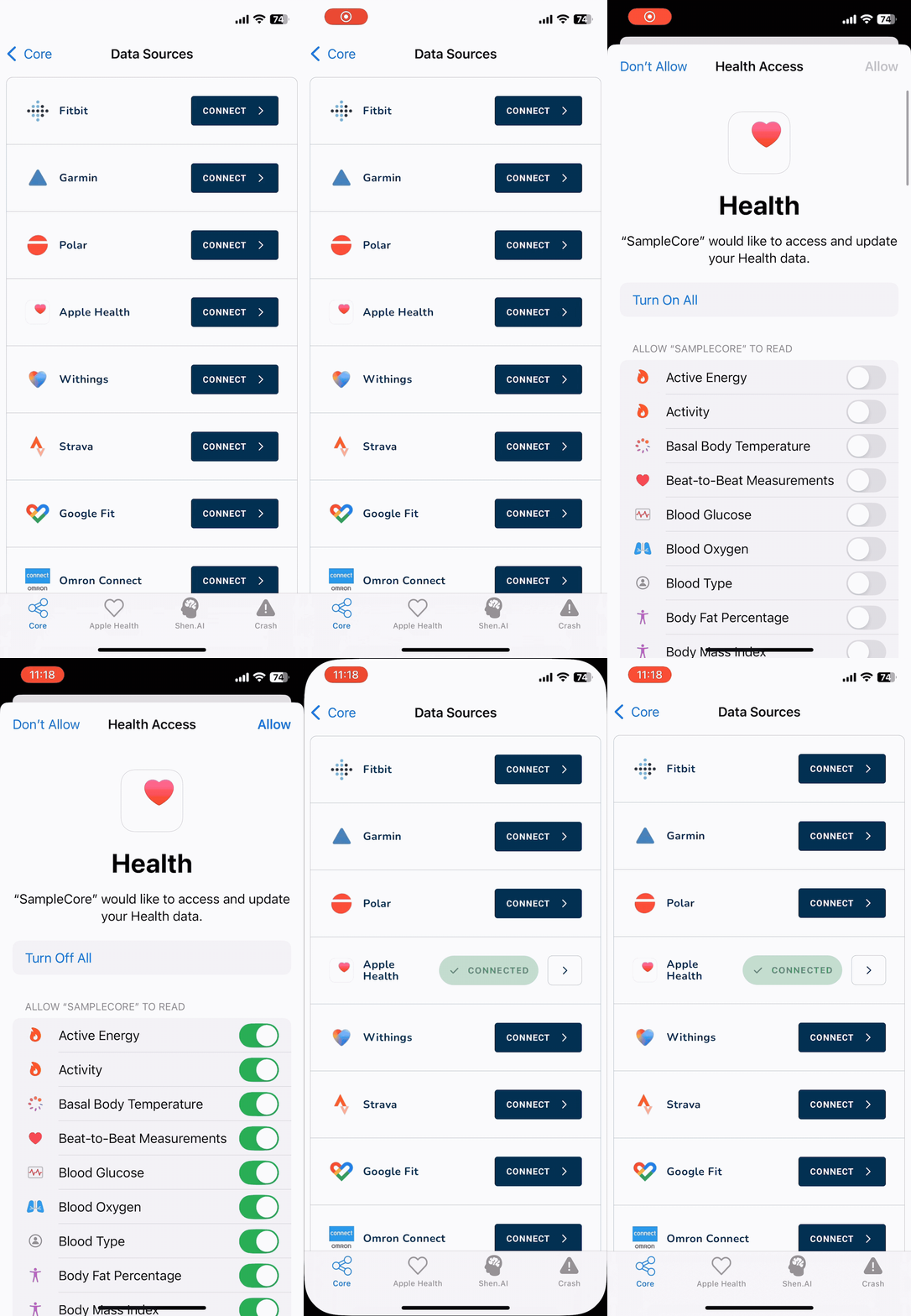
Thryve Connection Widget makes it super simple to allow users to connect theiir data sources
All data connections and data stored at Thryve are always linked to a Thryve user. A Thryve user will be automatically created or an existing user will be retrieved when initializing the SDK.
## Initialize the Thryve SDK
Create the `ThryveSDK` instance using `getOrCreate` and set up the `ThryveSDKConfig` object according to your needs. Initializing `ThryveSDK` will automatically create a new Thryve user or get an existing Thryve user based on `endUserAlias`.
{% tabs %}
{% tab title="iOS" %}
import ThryveCore
import ThryveCommons
import ThryveObservability
import ThryveAppleHealth
import ThryveShenAI
import ThryveBLE

let appleHealthConfig = ThryveAppleHealthConfig(
    dataTypes: ThryveAppleHealthDataType.allConnectorTypes,
    enableBackgroundSync: true // `true` by default
),

let thryveSDKConfig = ThryveSDKConfig(
    authId: "AUTH_ID",
    authSecret: "AUTH_SECRET",
    endUserAlias: "YOUR_UNIQUE_USER_IDENTIFIER",
    endUserId: nil,
    locale: "de",
    configs: [appleHealthConfig, shenAIConfig, bleConfig],
    observability: ObservabilityConfig(tracingEnabled: true, crashReportingEnabled: true)
)

await ThryveSDK.getOrCreate(thryveSDKConfig).getUserInformation()

// Optionally, when ThryveSDK is initialized from a non-async context (AppDelegate, legacy code, etc.),
// it is recommended to use the getOrCreate(...) callback to know when the SDK is ready.

ThryveSDK.getOrCreate(thryveSDKConfig) { initResult in
    if initResult.successful {
        Logger.i("ThryveSDK ready, you can start calling API methods")
    } else if let error = initResult.errors?.first {
        Logger.e("ThryveSDK init failed: \(error.errorMessage ?? "Unknown error")")
    }
}
{% endtab %}
{% tab title="Android" %}
```kotlin
import com.thryve.sdk
import com.thryve.sdk.commons
import com.thryve.sdk.healthConnect
import com.thryve.sdk.samsungHealth
import com.thryve.sdk.shenAI
import com.thryve.sdk.ble
val healthConnectConfig = ThryveHealthConnectConfig(
dataTypes = ThryveHealthConnectDataType.entries.toList(),
enableBackgroundSync = true,
enableReadHealthDataHistory = true
)
val samsungHealthConfig = ThryveSamsungHealthConfig(
dataTypes = ThryveSamsungHealthDataType.entries.toList(),
enableBackgroundSync = true
)
val shenAIConfig = ThryveShenAIConfig(
apiKey = "SHEN_AI_API_KEY",
eventsListener = object : ThryveShenAIEventListener {
override fun onEvent(event: ThryveShenAIEvent) {
when (event) {
ThryveShenAIEvent.MEASUREMENT_FINISHED -> { /* Shen AI measurement has finished and is about to be uploaded */}
ThryveShenAIEvent.MEASUREMENT_FAILED -> { /* Shen AI measurement has failed - handle failure */}
ThryveShenAIEvent.DATA_UPLOAD_FINISHED -> { /* Shen AI has finished uploading data */}
ThryveShenAIEvent.DATA_UPLOAD_FAILED -> { /* Shen AI has failed uploading data */}
ThryveShenAIEvent.USER_SUMMARY_FINISHED -> { /* The Shen AI flow has been completed */ }
}
}
}
)
val thryveSDKConfig = ThryveSDKConfig(
authId = "ASSIGNED_AUTH_ID",
authSecret = "ASSIGNED_AUTH_SECRET",
endUserAlias = "XXXXXXXXXXX",
endUserId = null,
locale = "de",
healthConnectConfig = healthConnectConfig,
samsungHealthConfig = samsungHealthConfig,
shenAIConfig = shenAIConfig,
bleConfig = bleConfig
)
val thryveSDK = ThryveSDK.getOrCreate(thryveSDKConfig, context)
/**Android SDK 5.0.5 introduced an optional callback to communicate the status
of internal processes of getOrCreate. ThryveSDK instance can now be created
with a callback as shown in the sample code below.
**/
val thryveSDK = ThryveSDK.getOrCreate(thryveSDKConfig, context) { thryveResponse ->
if(thryveResponse.successful){
//ThyveSDK initialization processes completed successfully
} else {
// ThryveSDK initalization process failed. process the ThryveErrors for the specific reason.
thryveResponse.errors.map { thryveError -> Logger.e(TAG){" getOrCreate ThryveError in onCreate function $thryveError"} }
}
}
```
{% endtab %}
{% tab title="ReactNative" %}
```javascript
import {
Source,
ThryveSamsungHealthDataType,
ThryveHealthConnectDataType,
ThryveAppleHealthDataType,
ThryveSDK
} from '@thryve/react-native-sdk';
const samsungHealthDataTypes = Object.values(ThryveSamsungHealthDataType);
const appleHealthDataTypes = Object.values(ThryveAppleHealthDataType);
const healthConnectDataTypes = Object.values(ThryveHealthConnectDataType);
export default (authId = AUTH_ID, authSecret = AUTH_SECRET) => {
const thryveSDK = new ThryveSDK();
const thryveSDKConfig = {
authId: appId,
authSecret: appSecret,
endUserAlias: "YOUR_UNIQUE_USER_IDENTIFIER",
locale: 'en',
configs: [
{
source: Source.APPLE,
dataTypes: appleHealthDataTypes,
},
{
source: Source.HEALTH_CONNECT,
dataTypes: healthConnectDataTypes,
enableBackgroundSync: true,
enableReadHealthDataHistory: true,
},
{
source: Source.SAMSUNG,
dataTypes: samsungHealthDataTypes,
},
{
source: Source.SHENAI,
apiKey: "SHEN_AI_API_KEY",
},
],
};
thryveSDK.getOrCreate(thryveSDKConfig)
.then(response => {
if (response.errors && response.errors.length > 0) {
console.error('Thryve init error:', response.errors[0].message);
}
})
.catch(e => {
console.error('Thryve init threw:', e);
});
return thryveSDK;
```
{% endtab %}
{% tab title="Flutter" %}
```dart
import 'package:module_apple_health/module_apple_health.dart';
import 'package:module_health_connect/module_health_connect.dart';
import 'package:module_samsung_health/module_samsung_health.dart';
import 'package:module_shen_ai/module_shen_ai.dart';
import 'package:thryve_sdk/thryve_sdk.dart';
final class ThryvePageBloc {
late ThryveSDK _thryveSDK;
ThryvePageBloc() {
_thryveSDK = injector();
_thryveSDK.init(
ThryveSDKConfig(
authId: 'ASSIGNED_AUTH_ID',
authSecret: 'ASSIGNED_AUTH_SECRET',
endUserAlias: 'XXXXXXXXXXX',
locale: 'en',
healthConnectConfig: ThryveHealthConnectConfig(
dataTypes: ThryveHealthConnectDataType.values,
enableBackgroundSync: true,
enableReadHealthDataHistory: true,
),
samsungHealthConfig: ThryveSamsungHealthConfig(
dataTypes: ThryveSamsungHealthDataType.values,
enableBackgroundSync: true,
),
appleHealthConnectConfig: ThryveAppleHealthConfig(
dataTypes: ThryveAppleHealthDataType.values,
),
shenAIConfig: ThryveShenAIConfig(apiKey: 'SHEN_AI_API_KEY')),
);
}
}
```
{% endtab %}
{% endtabs %}
{% hint style="warning" %}
There are two versions of `ThryveSDK` singleton initialization. Synchronous `ThryveSDK.getOrCreate()` and asynchronous `await ThryveSDK.getOrCreate()`. It is recommended to use async version when providing new config using `ThryveSDK.getOrCreate(newConfig)` to ensure `ThryveSDK` awaits user refresh safely
{% endhint %}
Parameter
Description
Mandatory
context
default Android context (only relevant for Android integration)
yes
authId
Credentials to authorize your app with the Thryve backend
yes
authSecret
Credentials to authorize your app with the Thryve backend
yes
{% hint style="warning" %} `ThryveSDK.getOrCreate` throws a `fatalError` and an `InitializationException` on iOS and Android respectively, that must be handled in your code. Starting from Android SDK 5.0.5, `InitializationException` is handled internally in the SDK and communicated in a `ThryveResponse` to the host application via an optional callback
{% endhint %}
## Create a Thryve user
The SDK will automatically take care of creating new users. It will also take care of managing existing users when endUserAlias is set. Therefore we highly encourage usage of endUserAlias as otherwise you will need to manually manage and set the endUserId for existing users. You can retrieve the `endUserId` of the current user using `getEndUserId` method.
Parameter
Description
Mandatory
endUserAlias
Unique identifier for your user that can be set optionally by you. Make sure to set a secure, non-predictable, unique identifier without personal identifiable information.
Maximum length is 80 characters, only alphanumeric characters and dash (-) are supported.
no
endUserId
Identifier used to authenticate your end-user with Thryve in network requests. Only set if you don't use the endUserAlias and want to initialize the SDK for an existing user.
no
{% hint style="warning" %}
With the introduction of Thryve SDK 5.0.0 former `accessToken` has been renamed to `endUserId` and `partnerUserId` has been renamed to `endUserAlias` for improved clarity. Functionality of parameters has not changed.
{% endhint %}
{% hint style="danger" %}
To avoid iOS SDK race conditions on `endUserId` refresh, please, use async version of `ThryveSDK.getOrCreate()` singleton init. Additionally, iOS SDK provides `.endUserIdDidUpdate` notification implementation to catch `endUserId` updates if needed: `NotificationCenter.default.addObserver(forName: .endUserIdDidUpdate, ...)`
{% endhint %}
### Set user language
The configured language is used in the UI provided by Thryve, like the Thryve Connection Widget. If not manually set by your app, the SDK will use the language set on the device.
Parameter
Description
Mandatory
locale
Manually set the language code following ISO 639-1 to set the language that will be used on UI elements, e.g. the Thryve Widget. If empty the SDK will get the phone's language.
no
## Display the Thryve Connection Widget
Thryve Connection Widget allows your end users to connect and disconnect all enabled data sources configured for your application without you needing to implement any views or logics.
Thryve Connection Widget makes it super simple to allow users to connect theiir data sources
The Thryve Connection Widget will be launched as a web-view and can be implemented within any view of your application by using `ThryveDataSourceConnectionWidget`.
{% tabs %}
{% tab title="iOS" %}
```swift
struct DataSourceConnectionView: View {
var body: some View {
VStack(spacing: 16.0) {
// 1. Option without a response
ThryveDataSourceConnectionWidget()
.frame(maxWidth: .infinity, maxHeight: .infinity)
.clipped()
// 2. Example using callback closure
ThryveDataSourceConnectionWidget { response in
Logger.i {
"Data source connection response: success=\(response.successful), data=\(response.data ?? false)"
}
if let error = response.errors?.first {
Logger.e { "Connection error: \(error.errorMessage ?? "")" }
}
}
.frame(maxWidth: .infinity, maxHeight: .infinity)
.clipped()
// 3. Or using SwiftUI binding
ThryveDataSourceConnectionWidget(responseBinding: $connectionResponse)
.frame(maxWidth: .infinity, maxHeight: .infinity)
.clipped()
.onChange(of: connectionResponse) { response in
if let response = response {
Logger.i { "Binding response: \(response.successful)" }
}
}
}
.navigationBarTitle("Data Sources", displayMode: .inline)
}
}
@ViewBuilder
private func mainView() -> some View {
VStack(alignment: .center, spacing: 16.0) {
NavigationLink(
destination: DataSourceConnectionView()
) {
Text("Connection Widget")
}
.modifier(ButtonModifier())
}
}
```
{% endtab %}
{% tab title="Android" %}
```kotlin
// Define optional theme
val theme = ThryveDataSourceConnectionWidgetTheme(
themeMode = ThemeMode.LIGHT, // or DARK/CUSTOM
// If using ThemeMode.CUSTOM, the colors below will be used,
// else they'll be ignored in favor of the default LIGHT/DARK theme colors.
backgroundColor = "#FFFFFF",
textColor = "#000000",
buttonBackgroundColor = "#000000",
buttonTextColor = "#FFFFFF",
)
//OPTION 1: adding ThryveDataSourceConnectionWidget in code.
lifecycleScope.launch {
try {
val view = ThryveDataSourceConnectionWidget.build(activity, "showthryve://com.thryve.sample", theme)
withContext(Dispatchers.Main.immediate) {
binding.dataSourceWidgetLayout.addView(view)
}
} catch (e: Exception) {
withContext(Dispatchers.Main.immediate) {
Toast.makeText(activity, "Unable to load data source connection widget: ${e.message}", Toast.LENGTH_LONG).show()
}
}
}
//OPTION 2: adding ThryveDataSourceConnectionWidget in your layout
// Using Android Compose
AndroidView(
factory = { ctx ->
try {
ThryveDataSourceConnectionWidget.build(
activity = ctx as ComponentActivity,
redirectUrl = "showthryve://com.thryve.sample",
theme = theme,
)
} catch (e: Exception) {
TextView(ctx).apply {
text = "Unable to load data source connection widget: ${e.message}"
}
}
}
)
```
{% endtab %}
{% tab title="ReactNative" %}
{% code overflow="wrap" %}
```javascript
import React from 'react';
import {ScrollView} from 'react-native';
import {ThryveDataSourceConnectionView} from '@thryve/react-native-sdk';
const DataSourceConnectionWidgetScreen = () => {
return (
);
};
export default DataSourceConnectionWidgetScreen;
```
{% endcode %}
{% endtab %}
{% tab title="Flutter" %}
```dart
import 'package:auto_route/auto_route.dart';
import 'package:flutter/material.dart';
import 'package:thryve_sdk/thryve_sdk.dart';
@RoutePage()
class ThryveDataSourceConnectionPage extends StatefulWidget {
const ThryveDataSourceConnectionPage({
super.key,
this.redirectUrl = 'showthryve://com.thryve.sample',
});
final String redirectUrl;
@override
State createState() => _ThryveDataSourceConnectionPageState();
}
class _ThryveDataSourceConnectionPageState extends State {
@override
Widget build(BuildContext context) {
return Scaffold(
appBar: AppBar(
title: const Text('Thryve Data Source Connection'),
),
body: ThryveDataSourceConnectionWidget(redirectUrl: widget.redirectUrl),
);
}
}
```
{% endtab %}
{% endtabs %}
{% hint style="info" %}
Apple Health, Health Connect, and Samsung Health will be shown in the Thryve Connection Widget only if their respective modules are imported and the data source is available on the device.
{% endhint %}
| Parameter | Description | Mandatory |
| ------------- | ------------------------------------------------------------------------------------------------------------------------------------------------------------------------------------------------------------------------------------------------------------------------------------------------------------------------------ | -------------------------------------------------------------------- |
| `redirectURL` | To automatically redirect users after connection or disconnection of web data sources, we recommend configuring a deep link. The specified redirectURI should link the user to the screen where Thryve Connection Widget is embedded within your application | no. Applicable to only native, react native and Flutter Android SDKs |
| `theme` | Optional instance of `ThryveDataSourceConnectionWidgetTheme` to style the widget with. Can define a default Light/Dark theme using `ThemeMode.LIGHT`/`ThemeMode.DARK`, or define a set of custom colors using `ThemeMode.CUSTOM` and providing values for `backgroundColor, textColor, buttonBackgroundColor, buttonTextColor` | no. If omitted, the widget will use the default light theme |
{% hint style="info" %}
For details on configuring the SDK modules for [ThryveAppleHealth, ThryveHealthConnect,ThryveSamsungHealth](/integrate-your-mobile-app/apple-health-health-connect-and-samsung-health.md#configuration), [ThryveBLE](/integrate-your-mobile-app/direct-bluetooth-device-connection.md#configure-the-thryveble-module) and [ThryveShenAI](/integrate-your-mobile-app/camera-based-health-data-recording.md#configure-the-sdk-module) modules, refer to their respective documentation pages.
{% endhint %}
---
# Agent Instructions
This documentation is published with GitBook. GitBook is the documentation platform designed so that both humans and AI agents can read, navigate, and reason over technical content effectively. Learn more at gitbook.com.
## Querying This Documentation
If you need additional information that is not directly available in this page, you can query the documentation dynamically by asking a question.
Perform an HTTP GET request on the current page URL with the `ask` query parameter, and the optional `goal` query parameter:
```
GET https://docs.thryve.health/integrate-your-mobile-app/connect-data-sources.md?ask=&goal=
```
`ask` is the immediate question: it should be specific, self-contained, and written in natural language.
`goal` is optional and describes the broader end goal you are ultimately trying to accomplish on behalf of the user. GitBook uses it to tailor the answer towards what is most useful for that goal.
The response will contain a direct answer to the question and relevant excerpts and sources from the documentation.
Use this mechanism when the answer is not explicitly present in the current page, you need clarification or additional context, or you want to retrieve related documentation sections.